
Faculté de biologie et de médecine - Wiki - Informatique
Navigation
Contacts - Impression
 Print
PrintQuick links
Being new at the FBM- Request a UNIL account (external)
- UNIL account activation
- FBM IT Charter validation
- Changing your password
- FBM IT manual
- Discovering the IT services
This is an old revision of the document!
Infrastructures
Thanks to the infrastructure of the IT services of the UNIL, we can offer many customised services to our users.
Space of central storage NAS (nas.unil.ch)
A space of storage (NAS) is offered to all members or affiliated members of the FMB departments. The NAS allows you to store your data safely and is characterized by:
- incremental daily backups;
- accessibility to the files from anywhere;
- high resistance to hardware and software failures;
- increase of security measures (antivirus, protection again loss of data, etc.).
Data stored on your local drive (i.e. not on the NAS) is not backed up.
A unique base structure for the entire Faculty enables an easy and safe exchange of information:
| Folder | Explanation |
|---|---|
| \FBM | This folder constitutes the root and contains one folder for each department. |
| \COMMON | This folder contains interdepartmental work files created on request with the Local IT Manager of the department. |
| \DEPARTEMENT | Every departmental folder is only accessible to the members of the concerned department. The folder is named after the department’s official abbreviation. For example: DPT, EM, DEC, etc. |
| \GROUPS | This folder offers the groups a logical and comprehensible work space. It enables members to easily exchange data and is accessible to all members of the concerned department. |
| \RESEARCH | Ce dossier recense tous les groupes/unités de recherche du département |
| \PI | Ce dossier nommé avec l'abréviation du PI (Principal Investigator) est un répertoire permettant aux membres du groupe de recherche de structurer les données de recherche du laboratoire. |
| \PRIVATE | Seul les membres du groupe de recherche ont accès à ce dossier en lecture et écriture |
| \PUBLIC | L'ensemble du département a accès à ce dossier en lecture et écriture |
| \USERS | Every user is granted a folder named after its UNIL username. |
You can access the NAS through two distinct addresses:
- \\nas.unil.ch\FBM
- \\nas.unil.ch\DEPARTEMENT (for example: DPT, DEE, DBMV, etc.)
| Windows | MacOS |
|---|---|
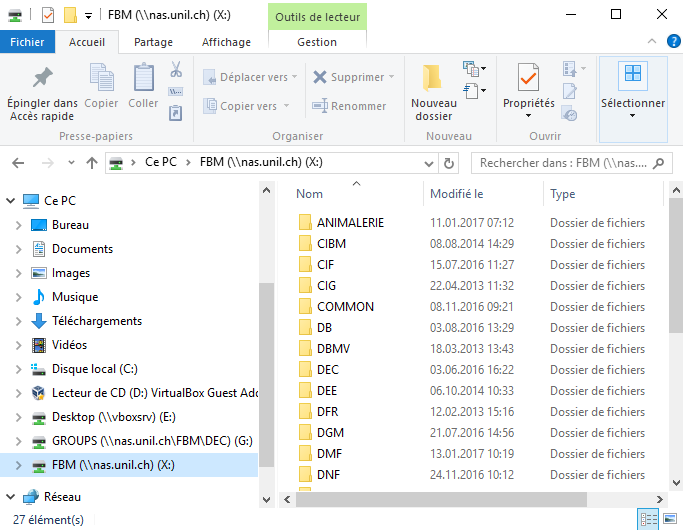 | 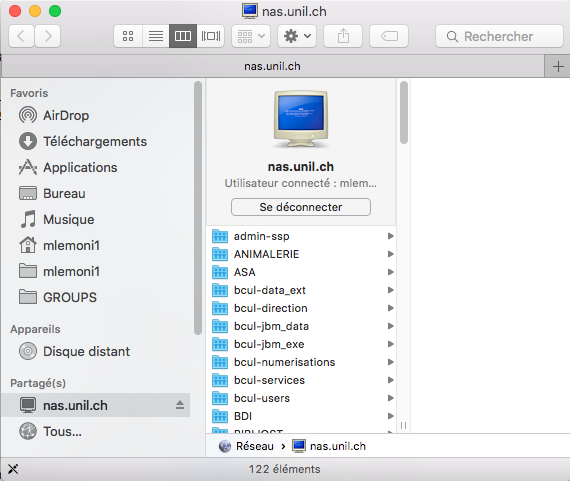 |
For the complete walkthrough, please refer to the following documentation:
Internet services / Intranet (wwwfbm.unil.ch)
Thanks to our web services, we can offer the community many tools to facilitate daily work:
- administrative intranet of the FBM (IAFBM);
- online survey tool (LimeSurvey);
- reservation system of rooms and scientific setups (FBM Calendar);
- loan system of IT resources available in the departments (FBM loan system);
- institutionalized and personalized web space.
Sharing of printing services (fbmprint.unil.ch)
To facilitate the printing from a Windows environment, all the printers are shared via a central server.
Document management system (fbmged.unil.ch)
To simplify the administrative work, an Document Management System (DMS) server is used.
Sharing of applications (fbmapp.unil.ch)
An applications server hosts many applications and allows the users to work on the same program at the same time, without having to install them on their computers.
- Kaleidagraph;
- Clonemanager;
Contact
For the sharing of other applications, please contact the IT Support of the FBM.